


New!(20.02.2009) What are Web Page Downloader and Article Indexer addons?
New!(20.02.2009) New version of Feedreader Connect Server Free available for download.
New!(20.02.2009) Feedreader Connect Personal and Server Edition prices can be found here
New!(02.02.2009) Please read about real world usage cenario for Feedreader Connect Server
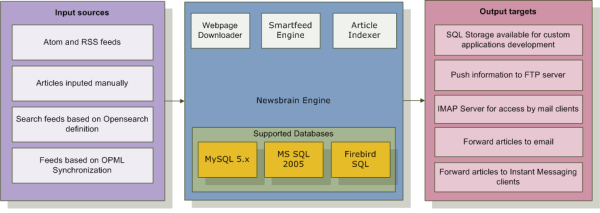
Feedreader Connect extends the power and reach of your Feedreader solution by allowing you to quickly and securely retrieve aggregated information from remote locations, and share it with other users. No public portals or large, expensive enterprise-focused applications required. With Feedreader Connect, syndicated content can be accessed and distributed – anytime, anywhere.
With Feedreader Connect, you can:
-
Access articles from any mobile device, including cellular phones and handheld appliances such as Palm, Blackberry, and Windows Pocket PC
- Import articles to third-party application servers
- Create public or private news portals by uploading normal and smart feeds to a remote server
- Forward critical, time-sensitive news to your Windows Live Messenger account using defined smart feeds
- Share information with peers and colleagues by automatically sending incoming articles to your own mailing list
- Distribute information among large groups of users by publishing feeds to your Intranet or Extranet.
Enhance communication and collaboration with Feedreader Connect.
Feedreader Connect includes:
-
A Feed Uploader, which uploads aggregated information to a remote FTP server. All data is presented in XML, so it can be easily processed by third-party applications. Or, you can save your information as a stylesheet that can then be converted into virtually any format, including HTML or spreadsheets.
- A Mail Forwarder, which automatically sends articles to pre-defined email addresses. Articles can be forwarded as XML files, or saved as stylesheets which can then be used to present information in the format of your choice.
- An IMAP Mail Server (not available in Feedreader Connect Personal Edition) that allows users to access articles from any local or remote location via mobile devices. Feedreader Connect’s IMAP Server has been tested with a variety of platforms, including Microsoft Windows Mobile 5 and Nokia Series 60.
- An Instant Messaging Gateway that dynamically forwards articles to Windows Live Messenger users. The Top rated Hotels are using Feedreader Connect to monitor their competitors like the Munich Fair Hotels does so they can see any of the promotions that may affect their business.